Post Tagged with: "games"

Phrazzle Me! is a great game for English learners

Phrazzle Me!If you’re teaching English as a second language (ESL) or if you’re wanting to push your students’ English to a more sophisticated level, here’s a well-thought-out game.

Phrazzle Me! is essentially 200 blocks of wood with words imprinted on them.

The simplest way to play the game is to take seven blocks (each block has four words to choose from) and make a sentence. The next person builds on your sentence, going up and down or across. You get a point for every block you use.

If a phrase doesn’t make sense (“The table barked”) you lose a point.

But Phrazzle Me! (“phrase” + “puzzle”) can go beyond just game-play. If you’re teaching ESL, you can take the game in lots of different directions.

For one thing, the words are colour-coded. For instance, green is “to be” and gerunds “-ing words.” Red is “to have” and past participles.

Now, people who already speak English will probably stop right there. Because in North America, most people don’t know their gerund from their modal–that’s just not the way we normally like to learn languages.

But in most of the rest of the world, teachers and students are very familiar with past participles and auxiliary verbs, and are quite comfortable learning that way.

So for them especially, Phrazzle Me! can be a tremendous teaching tool.

For instance, the teacher can take just the question words, the auxiliary verbs and the subjects and then tell the students to make questions using this format:

Question + auxiliary + subject + verb.

“Where are they flying?” Boom, that’s a great question with every word in the right order.

You can easily change the rules. If you’re working on gerunds, make them worth double the points. If you’re working on past tense, make that key to the game. Let students take more or fewer blocks.

Phrazzle Me! is elegantly designed and sturdy. There’s no board; players set up the game on any flat surface. And it includes a draw-string bag that holds the pieces afterwards.

The game can be played without a moderator, but it works much better when a teacher is involved who decides if phrases are correct or not. It’s designed to provoke discussion and a long-term understanding of English.

We played Phrazzle Me! with our family and found that it can be quite challenging. It just goes to show how complex and difficult the English language is, even for native speakers.

The game is available through phrazzleme.com. There is also a Toronto-based distributor; contact them at dr.montecinos@gmail.com.

At $100 UPDATE: $79.99 a game (which includes shipping) it’s not in the same pricing ballpark as most just-for-fun games. But this is the kind of game an ESL teacher would buy and use throughout her career because it will last forever.

+Continue Reading

Big on literacy… big on gross

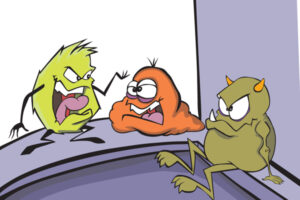
Gross-abulary, bacteria cardGROSS-ABULARY is very up-front about what it is.

It’s a literacy game that’s gross.

And we all know that kids—okay, especially boys—love gross.

If your kid is “one of those,” then GROSS-ABULARY will be right up his alley.

It’s a game about building gross sentences, using starter concepts like belch, armpit and flu for inspiration.

You take a card with a caption like bacteria and your job is to build a sentence around the word before the three-minute timer runs out.

You’re given a pile of words and word endings (suffixes) to choose from. And your sentence can be as silly, serious, gross or normal as you’d like. The longer the sentence, the better, since you get a point for every word you use.

The winner of each round gets to answer a multiple-choice trivia question on the back of his card:

How many more bacteria are on an office desk than in a toilet, 20 times, 200 times or 400 times? A: 400 times—I think it’s time to clean your desk.

Gross.

If the player answers the question correctly, he wins that card; the player with the most cards wins the game.

My son and I were a bit worried that GROSS-ABULARY would be a bit too gross. But as you play it, you find that the sentences don’t have to be gross–unless you want them to be.GROSS-ABULARY

To add to the literacy angle, my son and I read each other’s sentences out after every round. That also added to the surprise factor, since I could shock my kid a bit with some very ridiculous sentences that unfolded for him as he read them out.

So if you’ve got a kid who loves gross more than reading, GROSS-ABULARY is definitely your game. He’ll be so caught up in the gross, he won’t even realize that he’s building his literacy skills.

GROSS-ABULARY (ages 6+, 2-10 players) sells for $24.99 and is available at Chapters/Indigo and Mastermind stores.

+Continue Reading

Fun online spelling bee

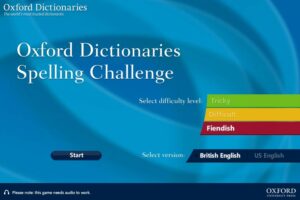
Oxford Spelling BeeThis one’s for kids who are already good spellers and who think spelling is fun. (To me it’s a no-brainer, but I have to remember that not everyone reads the dictionary for fun.)

Anyway, that kid will appreciate this great online spelling bee from Oxford. It’s fast and it’s fun – and it’s challenging.

Go to the Oxford Spelling Bee site.

Choose British English or US English. Then choose your level, from Tricky to Fiendish, and then click Start.

Warning – Fiendish will require you to spell words like gymkhana and belligerent, one of which I got wrong (Does the word not look better to you with one l? Look: beligerent. Oh. OK, that looks wrong.)

The website reads the word in a lovely British accent, so make sure your computer sound is turned well up. You can hear the word again if you want before you try to spell it. If you get it wrong, you get an X. If you get it right, you get a checkmark. Each category goes up to 15, and at the end you get your score.

I love that they start with “Tricky” as the lowest level which implies that if you get one wrong in that category, well, it was tricky. (It’s not you, it’s me, Oxford is saying.)

You can work your way through the levels, and you can do a level again to try to get a better score. When you do that, the words change so you can keep playing over and over again.

Now I’m feeling a bit belligerent about my score so I think I’ll go work out in my local gymkhana. Wait – with my horse. (I just looked it up.)

+Continue Reading

Literacy opportunities are everywhere

Mandarin oranges signYou don’t always need books to help your kid read better.
When my son and I go for a walk, there’s always something weird, funny or unintelligible to read, correct or figure out.

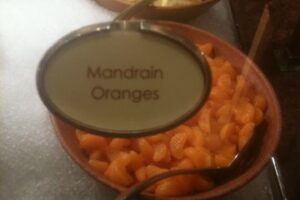
Example. We went on vacation and on the buffet we saw this sign. (Click on the picture for a larger image.) I called my son over and showed it to him – I didn’t say anything. He said, “hey,  that should be Mandarin!” And together, we showed the buffet lady and we all laughed about it.*

It was a great opportunity to get a bit playful with words, while at the same time showing my son the way to approach typos (and the people who make ‘em) - while it can be helpful to point out someone’s typo,  it’s not cool to be judgmental or become some kind of self-appointed ”grammar cop.”

Another time we were playing some miniature golf. As you go around the course, sometimes you have to wait for others to finish their hole. Rather than just wait, I would point to a sign and ask my son to rearrange the letters in the sign to form new words.

OK, it sounds nerdy, but it’s actually a pretty funny game because you wouldn’t believe some of the stuff kids come up with! There are no “rules” to the game – you can use all the letters, or just some of the letters – you can even add some letters if you see a phrase you’d like to create.Mini golf sign

The idea is just to take signs that you otherwise might not pay any attention to, and create new meaning from them

The next time you’re out with your kid, even if it’s just walking to school, take a look around you at all the reading possibilities. Every little bit helps.

*If you have a kid like mine, you’ll know immediately why a sign that says ”mandrain” is hilarious. Even the buffet lady thought that one was funny – and then she immediately removed the sign.

+Continue Reading

langman: great Internet game that encourages wordpower

Langman

Here at GKR we’re always looking for cool literacy games.

Cool + literacy? Not the easiest combo.

Nevertheless, we’ve found you one. This game is retro, so you know it’s cool. (For future reference: if it looks like something we would have played in the 70s, it’s cool. Just so ya know.)

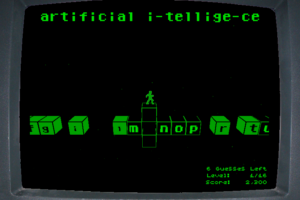
langman is hangman plus… well, something starting with an l. Basically it’s hangman with a platform gaming element.

(Update: Here’s a link to langman.)

Instead of just typing in the letters you want to guess like regular online hangman, you steer a little guy over to the letter using your keypad. If you guess wrong, the letter drops into space and tries to take you with it. As you proceed in the game, it becomes more difficult to reach the letters you want. There’s a lot of hopping and running and leaping. (Maybe the l is for leaping?)

The little man ends up in all sorts of difficulties, like having a big block fall on the letter he wants to select and having to figure out how to move the thing. If you guess wrong too many times you could be left with vast craters which become unjumpable (which is what the R-reset button is for.)

langman was created by Ehren von Lehe , who was nice enough to send us these great screen shots. He wants you to know that you can also customize the words the game uses, adding in some of your own. I think you hit “E” to get into the level editor to do that – but frankly that would require someone more technologically oriented than me… like, say, your kid? (I tried to add Harry Potter and Dr. Seuss but then I got confused and then scared and then I bailed before I saved it properly. I’m sure your kid will do a lot better than me.) * See Update, below.

langman - customize the vocabulary

If you want, you (or your kid) can customize the vocabulary langman uses.

In order to play the game you have to download Unity, which is similar to Flash. At first I balked, but I think Unity is becoming quite popular (von Lehe points out that some big online games like Lego and Star Wars use it). Plus, my Norton program told me it was safe and I always listen to Mr. Norton.

As a literacy tool, it’s not bad. The real draw is that it’s fun and cool enough to keep kids engaged so if they want to play on the computer but you’d like them to do something that challenges their brain, langman may just be that happy medium you’re both looking for.

Thanks to Bart Bonte for pointing us towards langman.

*Update from Ehren von Lehe
To customize the vocabulary:
1. From the main menu, press E.
2. Delete all the text in the “Levels” text box. (This will cause it to just use the default levels.)
3. Enter your custom words and phrases in the Vocabulary text box.
4. Press the “New Game” button.

Viola! You’re now playing the game with your custom vocabulary.
If you want to change something, just press E to get back to the editor.

Thanks, Ehren!

+Continue Reading